Utilities
core.get_current_modname(): returns the currently loading mod's name, when we are loading a modcore.get_modpath(modname): returns virtual path of given mod including the trailing separator. This is useful to load additional Lua files contained in your mod: e.g.dofile(core.get_modpath(core.get_current_modname()) .. "stuff.lua")core.get_language(): returns two strings- the current gettext locale
- the current language code (the same as used for client-side translations)
core.get_version(): returns a table containing components of the engine version. Components:project: Name of the project, eg, "MultiCraft"string: Simple version, eg, "1.2.3-dev"hash: Full git version (only set if available), eg, "1.2.3-dev-01234567-dirty" Use this for informational purposes only. The information in the returned table does not represent the capabilities of the engine, nor is it reliable or verifiable. Compatible forks will have a different name and version entirely. To check for the presence of engine features, test whether the functions exported by the wanted features exist. For example:if core.check_for_falling then ... end.
core.sha1(data, [raw]): returns the sha1 hash of datadata: string of data to hashraw: return raw bytes instead of hex digits, default: false
core.get_csm_restrictions(): returns a table ofFlagsindicating the restrictions applied to the current mod.- If a flag in this table is set to true, the feature is RESTRICTED.
- Possible flags:
load_client_mods,chat_messages,read_itemdefs,read_nodedefs,lookup_nodes,read_playerinfo core.copy_to_clipboard(text): Copies text to the clipboard
Logging
core.debug(...)- Equivalent to
core.log(table.concat({...}, "\t"))
- Equivalent to
core.log([level,] text)levelis one of"none","error","warning","action","info", or"verbose". Default is"none".
Global callback registration functions
Call these functions only at load time!
core.register_globalstep(function(dtime))- Called every client environment step, usually interval of 0.1s
core.register_on_mods_loaded(function())- Called just after mods have finished loading.
core.register_on_shutdown(function())- Called before client shutdown
- Warning: If the client terminates abnormally (i.e. crashes), the registered callbacks will likely not be run. Data should be saved at semi-frequent intervals as well as on server shutdown.
core.register_on_receiving_chat_message(function(message))- Called always when a client receive a message
- Return
trueto mark the message as handled, which means that it will not be shown to chat
core.register_on_sending_chat_message(function(message))- Called always when a client send a message from chat
- Return
trueto mark the message as handled, which means that it will not be sent to server
core.register_chatcommand(cmd, chatcommand definition)- Adds definition to core.registered_chatcommands
core.unregister_chatcommand(name)- Unregisters a chatcommands registered with register_chatcommand.
core.register_on_chatcommand(function(command, params))- Called always when a chatcommand is triggered, before
core.registered_chatcommandsis checked to see if that the command exists, but after the input is parsed. - Return
trueto mark the command as handled, which means that the default handlers will be prevented.
- Called always when a chatcommand is triggered, before
core.register_on_death(function())- Called when the local player dies
core.register_on_hp_modification(function(hp))- Called when server modified player's HP
core.register_on_damage_taken(function(hp))- Called when the local player take damages
core.register_on_formspec_input(function(formname, fields))- Called when a button is pressed in the local player's inventory form
- Newest functions are called first
- If function returns
true, remaining functions are not called
core.register_on_dignode(function(pos, node))- Called when the local player digs a node
- Newest functions are called first
- If any function returns true, the node isn't dug
core.register_on_punchnode(function(pos, node))- Called when the local player punches a node
- Newest functions are called first
- If any function returns true, the punch is ignored
core.register_on_placenode(function(pointed_thing, node))- Called when a node has been placed
core.register_on_item_use(function(item, pointed_thing))- Called when the local player uses an item.
- Newest functions are called first.
- If any function returns true, the item use is not sent to server.
core.register_on_modchannel_message(function(channel_name, sender, message))- Called when an incoming mod channel message is received
- You must have joined some channels before, and server must acknowledge the join request.
- If message comes from a server mod,
senderfield is an empty string.
core.register_on_modchannel_signal(function(channel_name, signal))- Called when a valid incoming mod channel signal is received
- Signal id permit to react to server mod channel events
- Possible values are: 0: join_ok 1: join_failed 2: leave_ok 3: leave_failed 4: event_on_not_joined_channel 5: state_changed
core.register_on_inventory_open(function(inventory))- Called when the local player open inventory
- Newest functions are called first
- If any function returns true, inventory doesn't open
core.register_on_hud_button_press(function(btn_name))- Called when a
csm_buttonHUD element is pressed - If function returns
true, remaining functions are not called
- Called when a
core.register_on_tab(function())- Called when tab key pressed
Sounds
core.sound_play(spec, parameters): returns a handlespecis aSimpleSoundSpecparametersis a sound parameter table
core.sound_stop(handle)handleis a handle returned bycore.sound_play
core.sound_fade(handle, step, gain)handleis a handle returned bycore.sound_playstepdetermines how fast a sound will fade. Negative step will lower the sound volume, positive step will increase the sound volume.gainthe target gain for the fade.
Timing
core.after(time, func, ...)- Call the function
funcaftertimeseconds, may be fractional - Optional: Variable number of arguments that are passed to
func
- Call the function
core.get_us_time()- Returns time with microsecond precision. May not return wall time.
core.get_timeofday()- Returns the time of day:
0for midnight,0.5for midday
- Returns the time of day:
Map
core.get_node_or_nil(pos)- Returns the node at the given position as table in the format
{name="node_name", param1=0, param2=0}, returnsnilfor unloaded areas or flavor limited areas.
- Returns the node at the given position as table in the format
core.get_node_light(pos, timeofday)- Gets the light value at the given position. Note that the light value "inside" the node at the given position is returned, so you usually want to get the light value of a neighbor.
pos: The position where to measure the light.timeofday:nilfor current time,0for night,0.5for day- Returns a number between
0and15ornil
core.find_node_near(pos, radius, nodenames, [search_center]): returns pos ornilradius: using a maximum metricnodenames: e.g.{"ignore", "group:tree"}or"default:dirt"search_centeris an optional boolean (default:false) If trueposis also checked for the nodes
core.find_nodes_in_area(pos1, pos2, nodenames, [grouped])pos1andpos2are the min and max positions of the area to search.nodenames: e.g.{"ignore", "group:tree"}or"default:dirt"- If
groupedis true the return value is a table indexed by node name which contains lists of positions. - If
groupedis false or absent the return values are as follows: first value: Table with all node positions second value: Table with the count of each node with the node name as index - Area volume is limited to 4,096,000 nodes
core.find_nodes_in_area_under_air(pos1, pos2, nodenames): returns a list of positions.nodenames: e.g.{"ignore", "group:tree"}or"default:dirt"- Return value: Table with all node positions with a node air above
- Area volume is limited to 4,096,000 nodes
core.line_of_sight(pos1, pos2): returnsboolean, pos- Checks if there is anything other than air between pos1 and pos2.
- Returns false if something is blocking the sight.
- Returns the position of the blocking node when
false pos1: First positionpos2: Second position
-
core.raycast(pos1, pos2, objects, liquids): returnsRaycast- Creates a
Raycastobject. pos1: start of the raypos2: end of the rayobjects: if false, only nodes will be returned. Default istrue.liquids: if false, liquid nodes won't be returned. Default isfalse.
- Creates a
-
core.find_nodes_with_meta(pos1, pos2)- Get a table of positions of nodes that have metadata within a region {pos1, pos2}.
core.get_meta(pos)- Get a
NodeMetaRefat that position
- Get a
core.get_node_level(pos)- get level of leveled node (water, snow)
core.get_node_max_level(pos)- get max available level for leveled node
Player
core.send_chat_message(message)- Act as if
messagewas typed by the player into the terminal.
- Act as if
core.run_server_chatcommand(cmd, param)- Alias for
core.send_chat_message("/" .. cmd .. " " .. param)
- Alias for
core.clear_out_chat_queue()- Clears the out chat queue
core.localplayer- Reference to the LocalPlayer object. See
LocalPlayerclass reference for methods.
- Reference to the LocalPlayer object. See
Privileges
core.get_privilege_list()- Returns a list of privileges the current player has in the format
{priv1=true,...}
- Returns a list of privileges the current player has in the format
core.string_to_privs(str): returns{priv1=true,...}core.privs_to_string(privs): returns"priv1,priv2,..."- Convert between two privilege representations
Client Environment
core.get_player_names()- Returns list of player names on server (nil if CSM_RF_READ_PLAYERINFO is enabled by server)
core.disconnect()- Disconnect from the server and exit to main menu.
- Returns
falseif the client is already disconnecting otherwise returnstrue.
core.get_server_info()- Returns server info.
core.send_respawn()- Sends a respawn request to the server.
Storage API
core.get_mod_storage():- returns reference to mod private
StorageRef - must be called during mod load time
- returns reference to mod private
Mod channels
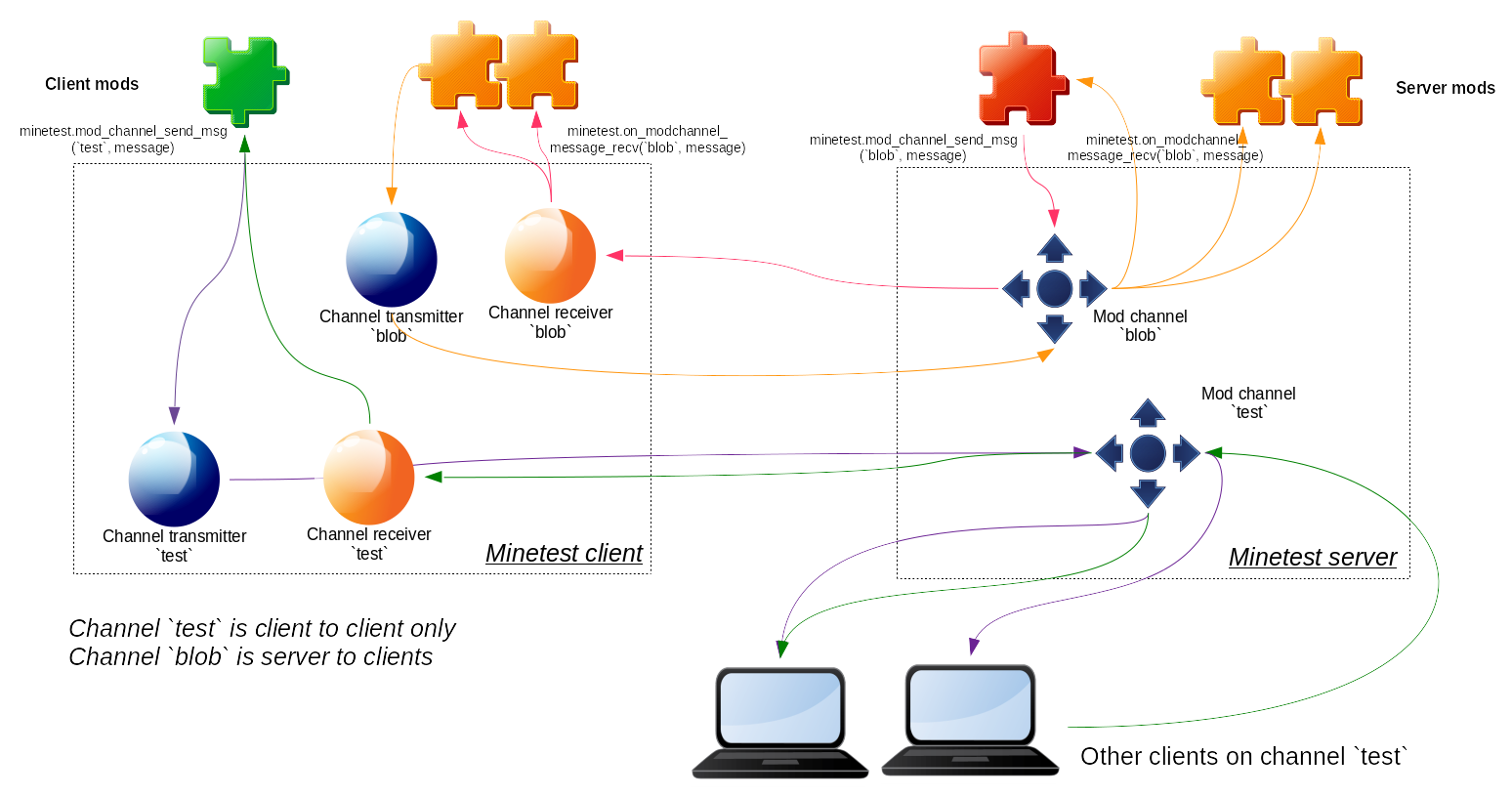
core.mod_channel_join(channel_name)- Client joins channel
channel_name, and creates it, if necessary. You should listen from incoming messages withcore.register_on_modchannel_messagecall to receive incoming messages. Warning, this function is asynchronous.
- Client joins channel
Particles
-
core.add_particle(particle definition) -
core.add_particlespawner(particlespawner definition)- Add a
ParticleSpawner, an object that spawns an amount of particles overtimeseconds - Returns an
id, and -1 if adding didn't succeed
- Add a
-
core.delete_particlespawner(id)- Delete
ParticleSpawnerwithid(return value fromcore.add_particlespawner)
- Delete
Misc.
core.parse_json(string[, nullvalue]): returns something- Convert a string containing JSON data into the Lua equivalent
nullvalue: returned in place of the JSON null; defaults tonil- On success returns a table, a string, a number, a boolean or
nullvalue - On failure outputs an error message and returns
nil - Example:
parse_json("[10, {\"a\":false}]"), returns{10, {a = false}}
core.write_json(data[, styled]): returns a string orniland an error message- Convert a Lua table into a JSON string
- styled: Outputs in a human-readable format if this is set, defaults to false
- Unserializable things like functions and userdata are saved as null.
- Warning: JSON is more strict than the Lua table format.
- You can only use strings and positive integers of at least one as keys.
- You can not mix string and integer keys. This is due to the fact that JSON has two distinct array and object values.
- Example:
write_json({10, {a = false}}), returns"[10, {\"a\": false}]"
core.serialize(table): returns a string- Convert a table containing tables, strings, numbers, booleans and
nils into string form readable bycore.deserialize - Example:
serialize({foo='bar'}), returns'return { ["foo"] = "bar" }'
- Convert a table containing tables, strings, numbers, booleans and
core.deserialize(string): returns a table- Convert a string returned by
core.deserializeinto a table stringis loaded in an empty sandbox environment.- Will load functions, but they cannot access the global environment.
- Example:
deserialize('return { ["foo"] = "bar" }'), returns{foo='bar'} - Example:
deserialize('print("foo")'), returnsnil(function call fails)error:[string "print("foo")"]:1: attempt to call global 'print' (a nil value)
- Convert a string returned by
core.compress(data, method, ...): returnscompressed_data- Compress a string of data.
methodis a string identifying the compression method to be used.- Supported compression methods:
- Deflate (zlib):
"deflate" - Zstandard:
"zstd"
- Deflate (zlib):
...indicates method-specific arguments. Currently defined arguments are:- Deflate:
level- Compression level,0-9ornil. - Zstandard:
level- Compression level. Integer ornil. Default3. Note any supported Zstandard compression level could be used here, but these are subject to change between Zstandard versions.
- Deflate:
core.decompress(compressed_data, method, ...): returns data- Decompress a string of data using the algorithm specified by
method. - See documentation on
core.compress()for supported compression methods. ...indicates method-specific arguments. Currently, no methods use this
- Decompress a string of data using the algorithm specified by
core.rgba(red, green, blue[, alpha]): returns a string- Each argument is a 8 Bit unsigned integer
- Returns the ColorString from rgb or rgba values
- Example:
core.rgba(10, 20, 30, 40), returns"#0A141E28"
core.encode_base64(string): returns string encoded in base64- Encodes a string in base64.
core.decode_base64(string): returns string- Decodes a string encoded in base64.
core.gettext(string): returns string- look up the translation of a string in the gettext message catalog
fgettext_ne(string, ...)- call core.gettext(string), replace "$1"..."$9" with the given extra arguments and return the result
fgettext(string, ...): returns string- same as fgettext_ne(), but calls core.formspec_escape before returning result
core.pointed_thing_to_face_pos(placer, pointed_thing): returns a position- returns the exact position on the surface of a pointed node
core.global_exists(name)- Checks if a global variable has been set, without triggering a warning.
UI
core.ui.minimap- Reference to the minimap object. See
Minimapclass reference for methods. - If client disabled minimap (using enable_minimap setting) this reference will be nil.
- Reference to the minimap object. See
core.camera- Reference to the camera object. See
Cameraclass reference for methods.
- Reference to the camera object. See
core.show_formspec(formname, formspec): returns true on success- Shows a formspec to the player
core.display_chat_message(message)returns true on success- Shows a chat message to the current player.
core.set_visible_controls(btns)- Sets the visible touchscreen controls
- If the
btnstable is empty or nil, all controls are visible. - Example:
{jump = true, joystick = true} - No-op if there is no touchscreen